
Problem: You've reached your plan's project limit
Solution:
Check Settings → Billing to see your current plan
Archive unused projects to free up slots
Upgrade to a higher plan for more projects
NEW: Ansehn supports Multi-Project Organizations
You can now add multiple projects to your Ansehn organization. Ideal for companies monitoring several domains or agencies managing multiple clients in one place.
A Project in Ansehn represents a single brand, website, or digital property that you want to monitor across AI search platforms. Think of a project as a complete monitoring workspace for one of your brands or business units.
Main Website Project: Monitor your primary company website (example.com)
Geographic Projects: Separate projects for different regional websites (example.com site vs. example.de site)
Client Projects (e.g., for agencies): One project per client you manage
Understanding the relationship between Projects and Organizations is key. An Organization is created for each user who signs up for Ansehn. A Project is always created within an Organization and owned by it. An Organization can hold 1 to many Projects (based on subscription plan limits).
Organization (Your Company)
├── Users & Teams (with roles and permissions)
├── Subscription & Billing
└── Projects (Multiple brands/properties you monitor)
    ├── Project 1: Main Website
    │   ├── Brand Details
    │   ├── Competitors
    │   ├── Monitors
    │   └── Prompts & Analytics
    ├── Project 2: Mobile App
    └── Project 3: Regional Site
The following table is an overview of the most important differences between Organizations and Projects:
Aspect | Organization | Project |
|---|---|---|
Purpose | Your team/company workspace | A specific brand/website to monitor |
Billing | Subscription plan attached here | Limits based on plan (e.g., 1-5 projects) |
Team Access | Users belong to an organization | Users can have different roles per project |
Data | Shared settings, billing | Unique monitoring data, competitors, and analytics |
Example: A marketing agency might have one Organization called "Agency XYZ" with 10 team members, but manages 15 different Projects (one for each client).
Each Project in Ansehn includes everything you need to monitor and optimize your AI search visibility:
Brand Details
Auto-generated brand profile including company description, target audience, key features, industry, and positioning - created from your website content.
Competitors
Ansehn’s AI identifies relevant competitors automatically. You can also add competitors manually. All competitor data is shared across monitors in the project.
Monitors
Configurable monitoring setups for different goals (e.g., Brand Awareness, Product Features) with custom schedules, competitor assignments, and dedicated analytics.
Prompts
10–500 questions per monitor, executed daily across AI platforms to track how your brand is mentioned over time.
Analytics & Insights
Citation and position tracking, keyword and semantic analysis, plus AI visibility metrics to uncover trends and opportunities.
Creating a new project in Ansehn is the first step to tracking your brand’s presence across AI search platforms. Projects can be created in just a few steps. All you need is some basic information about your website and goals, and Ansehn will handle the rest.
Before creating a project, have this information ready:
Project Name: What you'll call this project (e.g., "Main Website", "Acme Corp")
Website URL: The full URL of your website (e.g., https://example.com)
Country: Primary market for localization (default: US)
Industry (optional): Your business category
Business Goals (optional): What you want to achieve through Ansehn
From your dashboard:
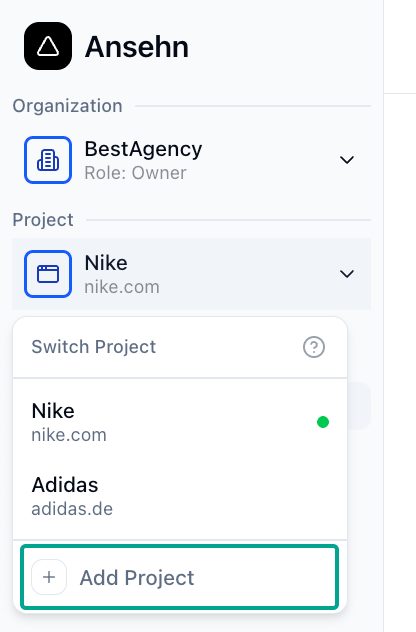
Click the project dropdown in the sidebar
Click "Add Project" button
Project Name: Main Website
Website URL: https://example.com
Country: United States
Industry: Software (SaaS)
Your Role: Marketing Director
Goals:
  ☑ Increase brand visibility
  ☑ Track competitor mentions
☑ Optimize contentFor your first project, Ansehn performs a comprehensive AI setup:
What Happens:
Website Analysis (1-2 min): AI scrapes and analyzes your website
Brand Profile Generation (30 sec): Creates detailed brand description
Competitor Research (1-2 min): Identifies 5-10 relevant competitors
Prompt Creation (1 min): Generates initial monitoring prompts
First Execution (2-3 min): Runs prompts across AI platforms
Total Time: 5-8 minutes
What You See:
Real-time progress tracking with status updates
You can close the modal and check back later
Email notification when complete
Immediate access to dashboard (data populates as it completes)
For subsequent projects, the process is much faster since we don't pre-generate the data and enable you to set it up manually instead, or use a specific AI Assistant to generate the content.
Ansehn, you can create multiple projects to separate different brands, business units, or markets. For example, an international company might create one project for its global .com domain and additional projects for regional websites (.de or .ca). Agencies can create separate projects for each client, making it easy to manage them all from one account.
In the Sidebar:
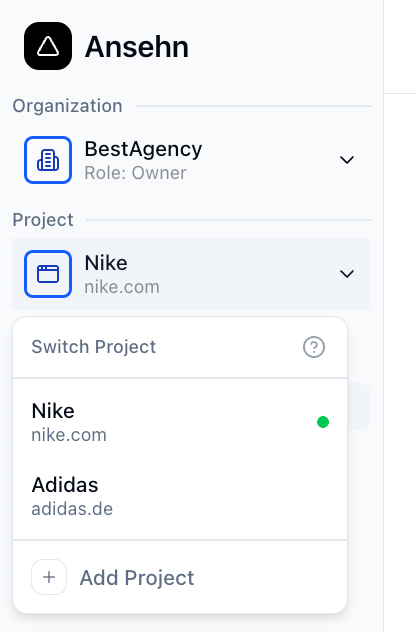
Click the project dropdown at the top of the sidebar
Select the project you want to view
All pages automatically update to show that project's data
Direct URLs: Every project page has a unique URL you can bookmark:
/dashboard/projects/[projectId]/monitors
/dashboard/projects/[projectId]/competitors
/dashboard/projects/[projectId]/analyticsYou can share direct links to specific project pages with team members:
https://www.ansehn.com/dashboard/projects/abc-123/competitorsTeam members will see the data if they have permission to access that project.
For detailed information about the roles and permissions system in Ansehn, please visit our Roles and Permissions page.
You can easily share specific project pages with your colleagues by sending them the direct URL. This deep linking feature allows the recipient to open the exact page you are viewing, such as the competitor's page, without needing additional navigation.
https://www.ansehn.com/dashboard/projects/abc-123/competitorsProblem: You've reached your plan's project limit
Solution:
Check Settings → Billing to see your current plan
Archive unused projects to free up slots
Upgrade to a higher plan for more projects
Problem: Project URL doesn't work
Possible Causes:
Project deleted: Check if it was removed
No access: You may not have permission for this project
Wrong organization: Switch to correct organization in sidebar
Invalid project ID: Check URL for typos
Problem: Project URL doesn't work
Possible Causes:
Project deleted: Check if it was removed
No access: You may not have permission for this project
Wrong organization: Switch to correct organization in sidebar
Invalid project ID: Check URL for typos
No, projects cannot be merged. However, you can:
Manually recreate monitors in one project
Archive the old project
Export and compare data across projects
Permanently deletes:
All project data (monitors, prompts, executions)
Analytics history
Brand details and competitors
Settings and configurations
Does NOT affect:
Organization or team members
Other projects
Subscription or billing
⚠️ This action cannot be undone!