
Overview
Server Logs Analytics reveals how AI companies access your website by analyzing your raw web server access logs. This is the ground truth of AI visibility—direct evidence of which AI crawlers are visiting your pages and when. Use it to verify access, find issues withrobots.txt, prioritize content, and track trends over time.
Why this matters and where to find your logs
For background on why this matters and where to find your logs, see these guides:
What you can do with Server Logs Analytics
Verify AI access: Confirm which AI companies are crawling your site (GPTBot, OAI-SearchBot, ClaudeBot, PerplexityBot, Gemini, Google-Extended, and more).
Identify blocked crawlers: Spot missing bots and diagnose
robots.txtissues.Track trends: See daily activity by crawler to monitor increases, drops, and spikes.
Prioritize content: Focus on pages most visited by AI crawlers.
Troubleshoot: Detect access errors or anomalies early.
💡 Pro tip: Compare crawler activity here with your insights in Citation Analytics to understand how crawling correlates with actual citations in AI answers.
How to import your logs
There are two ways to get your server logs into Ansehn:
Method | Best for | Setup effort |
|---|---|---|
Continuous, automated monitoring from any system. | Medium - one-time setup, then fully automated | |
Continuous, automated monitoring of CloudFront distributions | Low - one-time AWS setup, then fully automated | |
Continuous, automated monitoring for Cloudflare Enterprise customers. | Low - one-time setup, then fully automated | |
Continuous, automated monitoring for Cloudflare Free, Pro, or Business customers. | Low - one-time setup, then fully automated | |
One-time analysis, quick checks, any web server | Medium - upload a |
Supported AI crawlers
The dashboard automatically detects these crawlers (case-insensitive):
OpenAI:
GPTBot/1.2,OAI-SearchBot/1.0,ChatGPT-User/1.0Anthropic:
ClaudeBot,Claude-User,Claude-SearchBotPerplexity:
PerplexityBot/1.0,Perplexity-UserGoogle:
Gemini,Google-ExtendedMeta:
meta-externalagent(if present in your logs)... and more
Parsing & filtering rules
The parser automatically:
Filters to include only AI crawler traffic
Excludes non-
200responses from page statisticsRemoves
/robots.txtrequests from page rankingsGroups data by date and crawler type
Dashboard overview
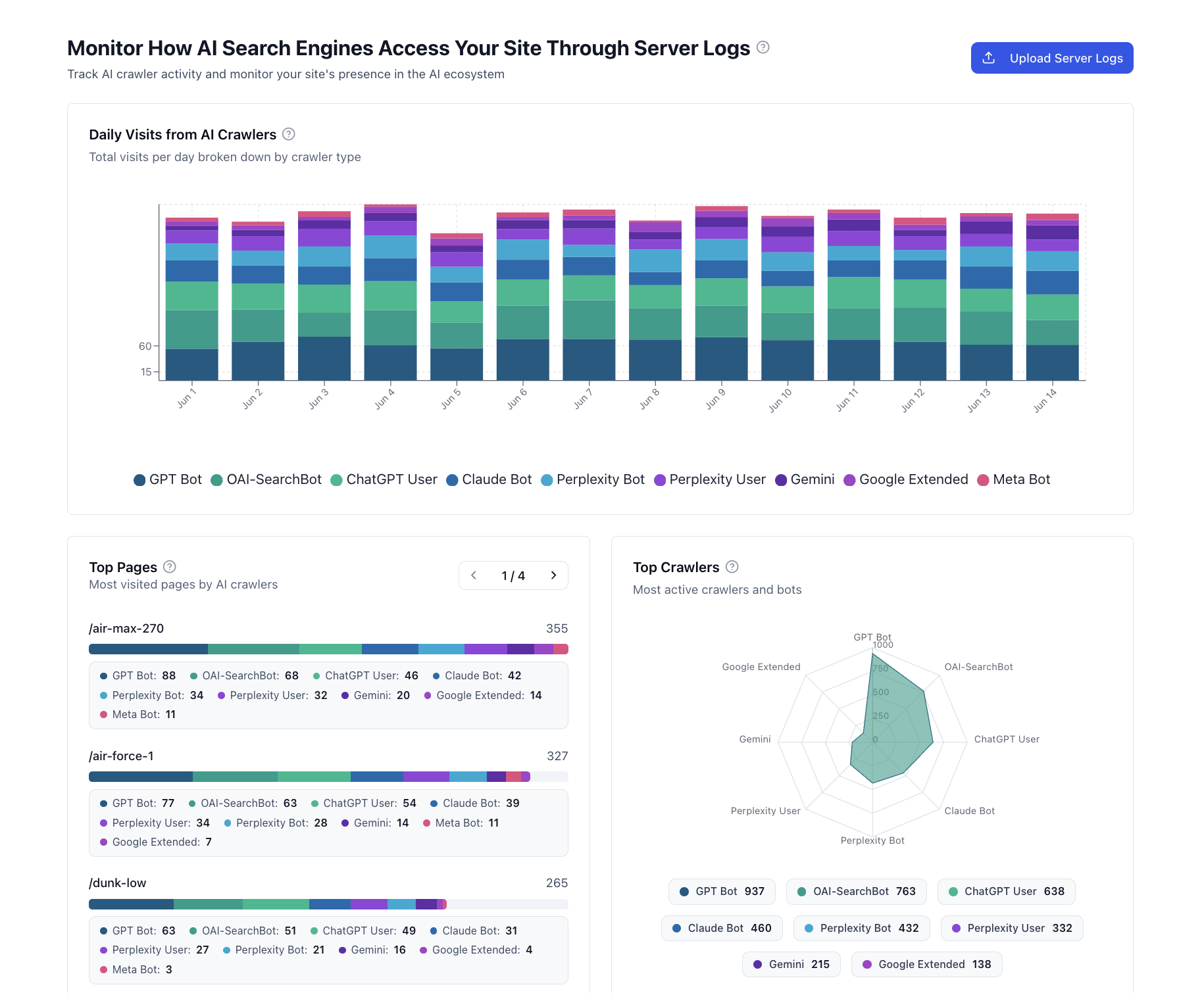
Daily Visits from AI Crawlers
Shows the daily volume of requests from AI crawlers and bot types. Each color represents a different crawler, stacked to show total daily activity.
What to look for:
Increasing activity: More frequent crawling due to fresh content or rising visibility
Sudden spikes: New content discovery, viral mentions, or model retraining cycles
Declines: Potential blocking via
robots.txt, stale content, or technical issuesMissing crawlers: Verify
robots.txtand allow rules for key bots
Take action:
Publish regularly so crawlers return more often
Investigate drops quickly to prevent visibility loss
Prioritize high-traffic days/pages for optimization
Update sitemaps to accelerate discovery
💡 Pro tip: Cross-reference with Citation Analytics to see if crawl volume correlates with citations in answers.
Top Pages (by AI crawler visits)
Highlights which pages AI crawlers visit most, with a breakdown by bot type. Pages with high visits are likely candidates for training data or citations.
Use this to:
Prioritize updates to pages that attract AI crawlers
Identify underperforming pages and content gaps
Replicate successful structures/topics
Detect if critical pages are unintentionally blocked
The dashboard displays up to 100 top pages, paginated 5 at a time.
Top Crawlers
Visualizes relative activity levels across AI crawlers. A balanced shape suggests broad AI visibility; dominance indicates one platform finds your content especially relevant.
Signals to watch:
Balanced distribution: Healthy visibility across platforms
Missing segments: Possible blocking or limited relevance
High "User" activity (
ChatGPT-User,Perplexity-User): Real users retrieving your content via AI search
Learn more
Why identifying AI bots matters and how they appear in logs: Monitor how AI search engines access your site through server logs
Where to access logs across hosting setups: How to Find Server Logs for Any Website